
How the AI note-taking assistant works for you
You provide the lecture material in whatever format you have, and the AI transforms it into a structured study guide ready for immediate review. No manual transcription or preliminary audio-to-text conversion required.
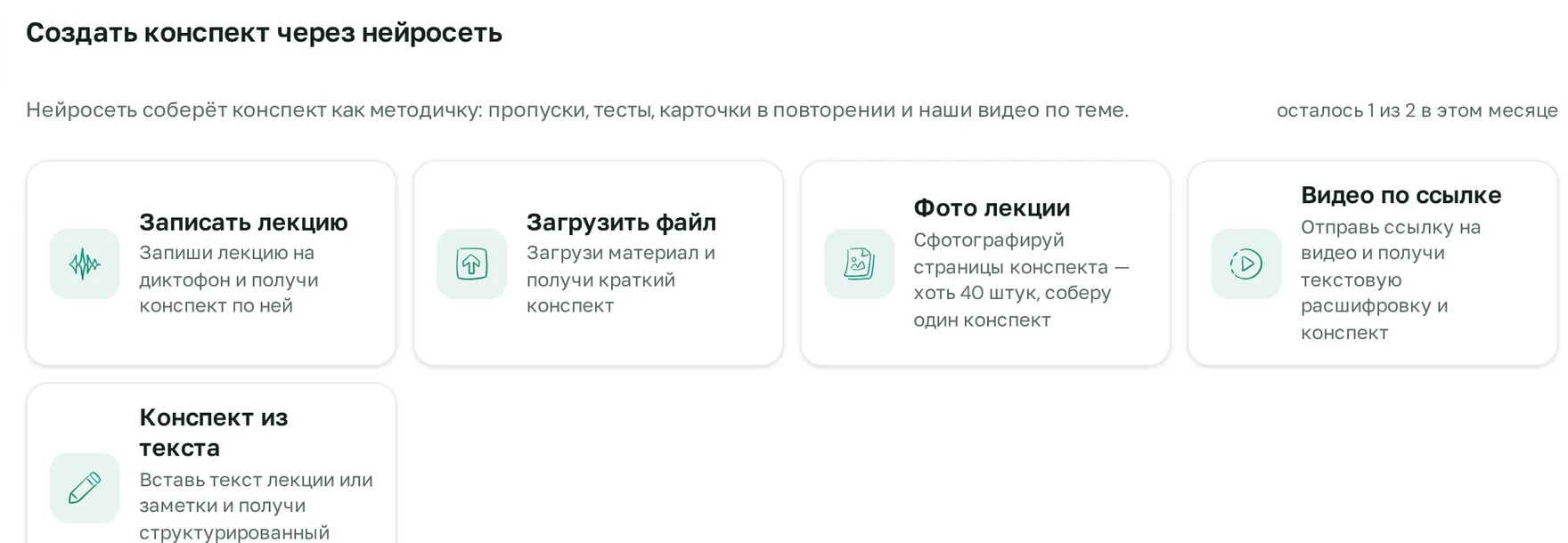
- Select a source. A lecture recording, YouTube, VK Video, or Rutube link, notebook photos, PDF, Word, or PowerPoint file, or simply pasted text.
- Upload your material. A link is enough for videos, and you can upload up to 40 notebook photos at once.
- Get your study notes. They are structured like a medical study guide: sections, fill-in-the-blanks for self-assessment, quizzes, and spaced-repetition flashcards. Topics are linked to the platform's lessons.
The service works in Russia without a VPN. Log in via email, Telegram, VK, or Google, and pay with a Russian bank card. iOS app available.
What sources can the AI turn into notes
The key difference from "universal" text generators: the notes are built from your actual material, not hallucinated by the model based on the topic title. This ensures your specific lecturer's key points are preserved.
Summarizing videos: YouTube, VK Video, Rutube
Paste a link to a video lecture or breakdown, and the AI will generate notes from the video without requiring a download. This is convenient for departmental webinar recordings, open lectures, and long deep-dives that are tedious to rewatch in full before an exam. Video duration is deducted from your transcription minutes (limits below).
Notes from audio: lecture or class recordings
Record your lecture on your phone's voice recorder and upload the file. The AI will transcribe the speech and assemble it into lecture notes: removing tangents and repetitions while organizing the material by section. Recordings made closer to the lecturer work best—less ambient auditorium noise means more accurate terminology transcription.
Notes from notebook and blackboard photos
If you took handwritten lecture notes or photographed the board, upload the pictures: up to 40 photos per note set. The AI will combine scattered pages into coherent text, establish a logical structure, and add review questions. Shoot in good lighting without steep angles for the most reliable text recognition.
Notes from PDF, Word, and presentations
A lecturer's presentation usually consists of fragmented phrases and diagrams, making it difficult to study from. Upload a PowerPoint, PDF, or Word file, and the AI will generate study notes from the presentation or department study guide: expanding bullet points into clear text, preserving slide logic, and adding quizzes. The same applies to notes generated from PDF textbooks or articles.
Notes from text or topic name
You can paste raw text: a chapter, your own notes, or a transcript from elsewhere. If you have no material at all, simply specify a topic—such as "Chronic heart failure" or "The Krebs cycle"—and the AI will generate a comprehensive study guide on that subject.
The final output: notes designed like a study guide
A standard lecture transcript is read once and forgotten. The notes here are structured as a learning resource you can work with right up until the exam.
- Section structure. Definitions, classifications, pathomechanisms, conclusions. Lecture material is broken down so you can review it in minutes.
- Fill-in-the-blanks. Key terms and numbers can be hidden for active recall. This is active recall practice, which outperforms passive re-reading.
- Quizzes. Content-based questions to verify you actually understood the lecture, not just read it.
- Spaced-repetition flashcards. Bring material back at increasing intervals so it stays fresh until exam sessions.
- Integration with platform lessons. Note topics are linked to WhiteCoat Pro video lessons (31 subjects, 3,400+ video lessons), allowing you to immediately open a detailed review for any confusing concept.
Example: lecture on chronic heart failure
Suppose you uploaded a lecture recording on CHF. The structure of the notes will look something like this:
- Sections: definition, classification (Strashesko-Vasilenko stages, NYHA functional classes), pathogenesis with activation of the renin-angiotensin-aldosterone and sympathoadrenal systems, clinical presentation, diagnostics, management.
- Fill-in-the-blank: "When CHF is suspected, the level of natriuretic peptide ___ is determined and ___ is performed," where NT-proBNP and echocardiography are hidden.
- Test question: Which NYHA functional class corresponds to dyspnea during normal physical exertion and its absence at rest? Answer: II.
- Flashcard: "HFrEF (Heart Failure with reduced Ejection Fraction)" on the front, and "Left ventricular EF below 40%" on the back.
It's convenient to review these notes before class, and use the flashcards to reinforce the topic a few days later when you begin to forget it.
What else you can create from your notes
- Podcast. Your notes are converted into audio that you can listen to on the go.
- Presentation. A slide outline is generated from your notes, which you can edit and export as a PPTX or PDF presentation. Read more in the article how to create a medical presentation using AI.
- Voice examination. The examiner asks questions on the topic, and after the conversation, highlights what you stated correctly, what you missed, and gives you a grade.
What types of lectures is it suitable for
The Lecture Notes AI works with any lecture: humanities, technical, or language-based. However, it performs best with medical subjects where the platform provides study guides and video lessons: 31 subjects in total and over 3,400 video lessons. In these subjects, note topics are linked directly to lessons, and you can immediately ask the AI tutor questions about the material.
This tool is most convenient for those with heavy lecture loads and limited time: junior students dealing with massive volumes of theory, seniors preparing for exams and accreditation, and residents watching conference and webinar recordings. Read our complete guide on session preparation in the article AI for exam preparation.
AI for medical lecture notes: how it stands out
You can generate notes for any lecture, but this tool was specifically built for medical students, residents, and physicians. In medicine, the cost of an error in your notes is high: a confused dosage or diagnostic criterion will resurface during exams or accreditation. That is why source verification is critical.
| Key considerations | Universal chatbot | WhiteCoat Pro Neural Network |
|---|---|---|
| Where does the content come from | Often from the model's parametric memory, based on the topic title | From your own material: recordings, videos, photos, files, text |
| Source verification | May hallucinate links or figures | Topics are linked to platform lessons; the AI tutor answers based on study guides and clinical guidelines with page citations |
| Russian clinical guidelines and study guides | Usually unknown | Available in the platform's database |
| Output format | Continuous text block | Study guide format: fill-in-the-blanks, tests, flashcards |
| Access from Russia | Depends on the service; ChatGPT requires a VPN | No VPN, paid with a Russian bank card |
If something in the study notes raises doubts, ask the AI tutor. It answers based on the platform's study guides and clinical guidelines, adds footnotes [1], [2] to the guide pages, and shows which video review to watch. Sources are never hallucinated: every footnote leads to a specific, openable material. We cover all features for study and practice on the AI for medical professionals page.
Create study notes online: free and paid tiers
The AI notes generator is available for free on any account. Limits are counted monthly.
| Access | Notes per month | Transcription minutes per month |
|---|---|---|
| Free account | 2 | 120 |
| Paid access to a subject | 30 | 600 |
| «Maximum» plan | 80 | 1 600 |
Transcription minutes are needed for audio and video: this is the recording duration that the AI translates into text. A 90-minute lecture will take about 90 minutes, so the free limit is enough to try it out on one real lecture. See plans and access details on the pricing page.
How to write study notes using AI so they are easy to learn from
- One lecture, one set of notes. Do not merge three classes into a single file: the topics will mix, and the flashcards will become too general.
- Choose the most comprehensive source. If you have both a lecture recording and slides, the recording is usually richer: it contains explanations not found on the slides.
- Double-check numbers and terms. Verify dosages, criteria, and classifications against your study guide or clinical guidelines, for example using clinical guidelines with AI answers.
- Study using tests and flashcards, not by rereading. The fill-in-the-blanks and questions in the notes are there for this exact purpose.
- Ask about anything unclear immediately. The AI tutor answers based on study guides with page footnotes and understands photos, PDFs, and Word documents. Available on any account, even the free one, up to 30 messages per hour.
- Recite the topic out loud before the exam. This shows what you can actually explain versus what you only recognize while reading.
A step-by-step guide with examples for each source is available in the article how to make lecture notes with AI, and for quick summaries before an exam, check out the article AI for cheat sheets.
Fair limitations
- Notes must be verified. AI can make mistakes, especially if the lecturer was hard to hear or the photo is blurry. That is why the product includes sources and links to lessons.
- Quality depends on the source material. A noisy recording, cropped video, or unreadable handwriting will yield less accurate text.
- This is a learning tool. The AI does not diagnose patients or prescribe treatment for individuals.
- No patient data. Do not upload full names, dates of birth, addresses, or insurance policy numbers: this violates medical confidentiality (Art. 13 of Federal Law 323-FZ) and personal data protection (152-FZ).
- Limits are finite. A free account includes 2 notes and 120 transcription minutes per month; for regular subject study, paid access is more convenient.
- Tool profile. It is designed for student lectures and study materials, not for lesson planning.
Frequently asked questions
Which AI creates study notes from video?
The WhiteCoat Pro AI generates notes from YouTube, VK Video, or Rutube links: no need to download files. Video duration is deducted from your transcription minutes; free accounts get 120 minutes per month.
Is there a free AI for making notes?
Yes. Any free account includes 2 notes and 120 minutes of audio/video transcription per month. Paid subject access provides 30 notes and 600 minutes, while the «Maximum» plan offers 80 notes and 1,600 minutes.
Can I create study notes from photos online?
Yes, upload photos of your notebook or whiteboard—up to 40 images per note set. The AI will compile the pages into coherent text with sections, tests, and flashcards.
How do I make study notes from an audio lecture recording?
Record the class on a voice recorder and upload the file in the «Create notes» tab. The AI will transcribe the speech and compile lecture notes. The closer the recording is to the lecturer, the more accurate the terminology.
Can AI generate study notes from a PDF or presentation?
Yes, PDF, Word, and PowerPoint formats are supported. Slide bullet points are expanded into clear text, and fill-in-the-blanks, tests, and review flashcards are added to the notes.
Can you trust AI-generated notes?
Notes are built from your material, and topics are linked to platform lessons, but numbers and terms should be verified. For verification, use the AI tutor, which answers based on study guides and clinical guidelines with source footnotes.
Does the AI notes generator work in Russia without a VPN?
Yes, the service works in Russia without a VPN. Log in via email, Telegram, VK, or Google, and pay with a Russian bank card. An iOS app is available.